
The Day I Lost My First Ten Dollars: My Hunt for the Best Mobile Trading App for Beginners
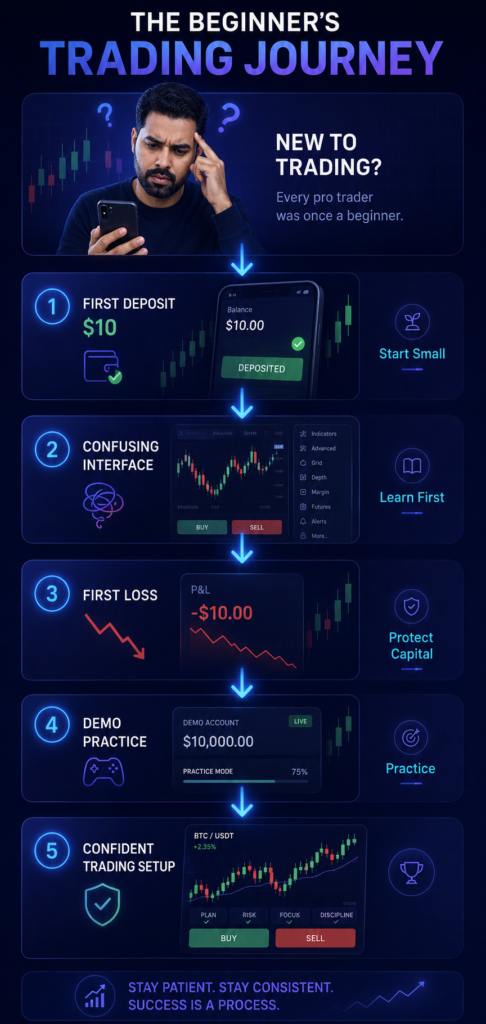
I still remember the exact shape of the cloud outside my window when my first live trade ended in the red. It was a crisp morning, and I was sitting on my couch with a lukewarm cup of coffee, staring at a flashing line on my smartphone screen. I had just deposited ten bucks, convinced that my intuition alone could predict the massive swings of global financial markets.
Two minutes later, my balance read zero.
It did not hurt because of the money. It hurt because of the sheer confusion. The screen was a chaotic jungle of red and green arrows, jagged lines, flashing buttons, and sudden pop-ups that felt like a casino floor. I felt completely overwhelmed, lost, and let’s be honest, pretty stupid.
That rough morning taught me a vital lesson: for a beginner, the interface you choose is your lifeline. If your software is too complicated, you will lose money simply by hitting the wrong button. I spent the next several months downloading, testing, and sometimes breaking every major financial app on the market to find the absolute best mobile trading app for beginners. I wanted to discover which tools actually hold your hand through the learning curve, and which ones just want to drain your wallet.
If you are staring at your phone wondering where to start, here is my raw, unfiltered journey through the landscape of retail market apps.
The Intimidation Wall and Why Software Choice Matters
When you are starting out, the learning curve is steep enough without bad design making it harder. You are trying to grasp price action, learn market hours, and master emotional discipline all at once. If your platform is a laggy mess or looks like a dashboard from a spaceship, you are setting yourself up to join a very painful statistic.
In fact, tracking data reveals the harsh reality of why ninety percent of traders lose money. Most of those losses do not happen because the market is rigged; they happen because beginners dive into volatile environments without a solid routine, proper risk management, or an understandable interface.
I learned the hard way that a clean screen is not just a cosmetic feature; it directly impacts your execution speed. A split-second lag or a hidden order cancellation button can be the difference between locking in a small profit or wiping out your daily balance. I realized I needed a platform that cut out the noise and let me focus purely on the movement of price.
Finding My Footing: The Low-Barrier Testing Phase
After my initial loss, I decided to pull back and set strict rules. I refused to deposit hundreds of dollars into untrusted systems. Instead, I searched specifically for networks that allowed me to dip my toes in the water with minimal financial risk.
I began seeking out platforms with low entry requirements to protect my capital while I built up my chart-reading confidence. If you are in that same boat, looking over a curated list of the safest trading platforms with real risk breakdowns will save you months of painful trial and error.
During this research phase, I discovered that some platforms let you start trading with pocket change. I documented my early progress by tracking a micro-account, which you can read about in my deep dive on starting with ten dollars on Quotex. Testing platforms with tiny balances helped me overcome the psychological fear of losing money without putting my rent budget at risk.
Through all this testing, two major mobile giants continually stood out from the crowd for absolute beginners: IQ Option and Binomo. Let’s look at exactly how they performed when I put them through their paces.
The Heavyweight Battle: IQ Option vs. Binomo
If you search your phone’s app store right now, these two platforms will inevitably dominate your recommendations. They look similar at a distance, but using them on a daily basis reveals two completely different trading experiences.
IQ Option: The Visual Standard
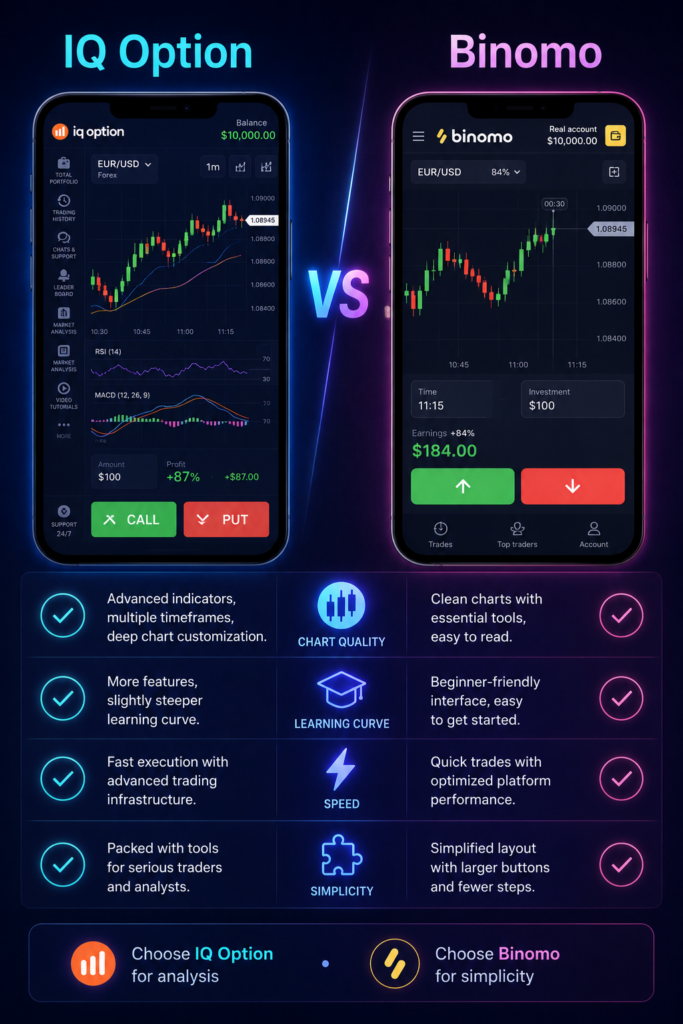
When I first opened the IQ Option Mobile Application, the immediate takeaway was the absolute beauty of the charts. For an app running on a five-inch phone screen, the level of smooth scaling is incredible.
I could pinch to zoom out through days of historical data or zoom in to watch individual second-by-second ticks without any stuttering. For a beginner trying to understand support lines, multi-chart layouts, and indicators, this app is a dream. It genuinely feels like a professional desktop suite squeezed into your pocket.
Binomo: The Streamlined Alternative
If IQ Option is a feature-rich sports car, Binomo is a rugged, reliable commuter vehicle. Opening the Binomo platform revealed a much simpler, highly focused layout. It strips away a lot of the advanced analytical tools that can confuse someone who does not even know what a moving average is yet.
The focus here is pure, uninterrupted execution. The buttons are massive, the call-to-action is clear, and the app runs flawlessly even when your cell service drops down to a couple of bars.
When I compared them head-to-head for daily use, the differences became glaringly obvious. If you want to see a side-by-side battle of these two giants on smaller accounts, check out my breakdown of Binomo vs IQ Option for small accounts.
For me, the winner came down to what I wanted out of my morning sessions. If you are still torn between the two, you can read my direct breakdown on which is easier for beginners, Binomo or IQ Option, to see which platform fits your personal learning style.
The Dark Horse Options: Deriv and Pocket Option
While the main battle usually rages between the big two, my search for the best mobile trading app for beginners led me to a few other fascinating alternatives that offer unique features for newcomers.
Deriv: The Risk-Management Champion
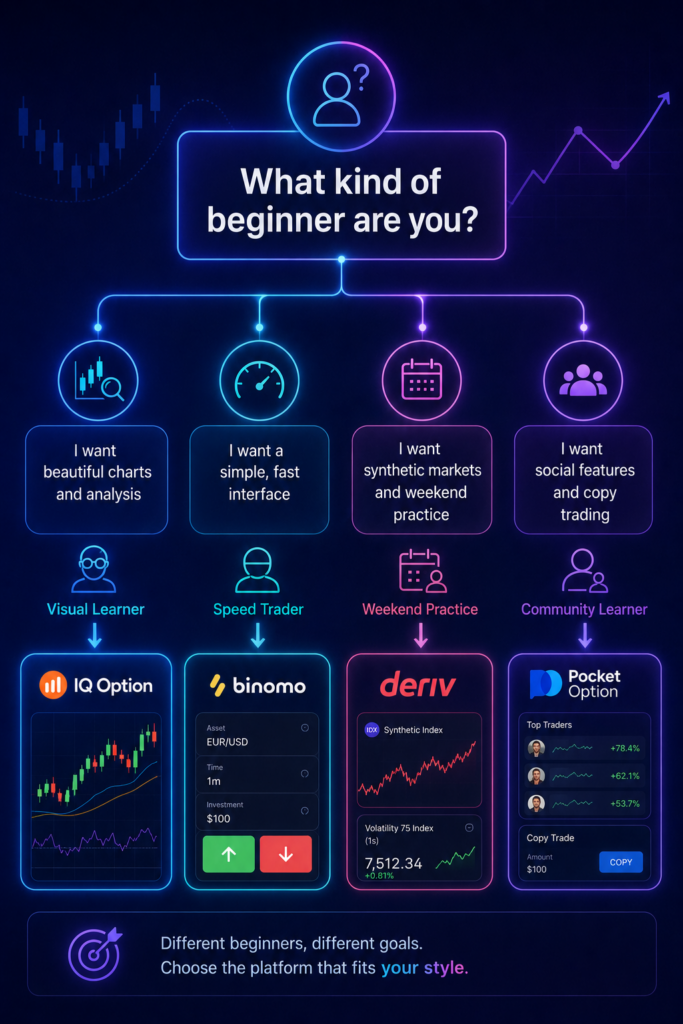
If you are terrified of sudden market gaps or extreme volatility, The Deriv Trading Suite is a breath of fresh air. What makes this platform unique is its proprietary synthetic indices. These are crash and boom markets simulated by secure algorithms, meaning they mimic real-world market movements but remain completely unaffected by sudden global news events or political announcements.
For a beginner, this is an incredible learning environment. You can practice technical setups on a weekend afternoon without worrying about a sudden central bank announcement blowing up your position overnight.
If you are caught between classic assets and these unique alternatives, check out my comprehensive guide on Deriv vs IQ Option for beginners. It will give you a clear look at how synthetic assets stack up against standard currency pairs.
Pocket Option: The Feature-Packed Powerhouse
Another platform that caught my attention during my live tests was the Pocket Option Interface. It bridges the gap between simplicity and functionality by offering a massive variety of deposit options, built-in social copy features, and rapid-fire contract durations. It is highly engaging and serves as an excellent sandbox for developing fast reflexes on shorter chart intervals.
What Every Beginner Should Look for in an App
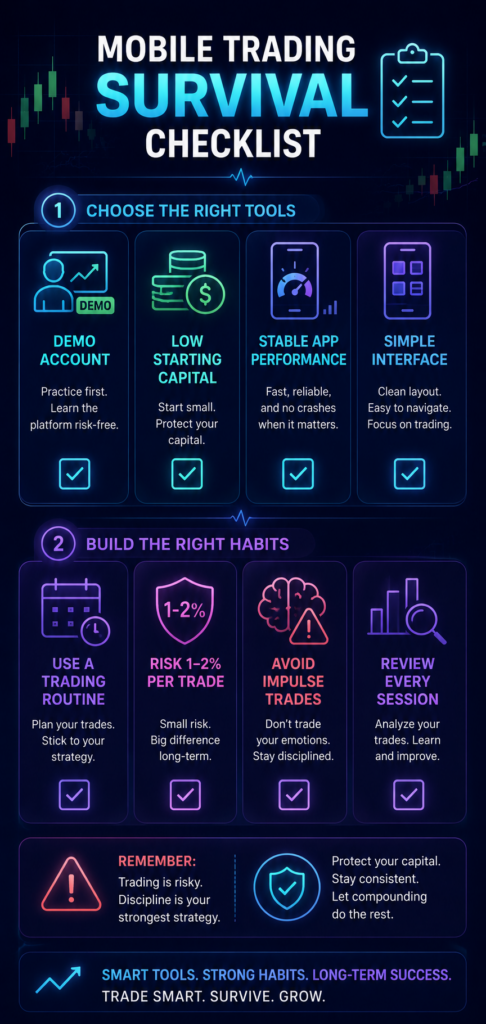
After spending hundreds of hours tapping away on my screen, I realized that finding the best mobile trading app for beginners boils down to four non-negotiable pillars:
- An Unrestricted Demo Account: If an app requires you to deposit real money before you can touch their chart simulator, delete it immediately. You need a safe space with replenished virtual funds to make mistakes, test strategies, and get familiar with the UI without any real financial consequences.
- Low Initial Financial Barriers: When you feel ready to move to live funds, you should never risk substantial amounts of money. Look for platforms that allow a modest initial setup. You can explore this concept deeper in our manual on the best brokers for a ten-dollar deposit.
- Glitch-Free Software Performance: A beautiful app is completely useless if it freezes right when you try to exit a volatile position. Prioritize platforms that maintain stability even during busy market hours.
- Straightforward Features: Avoid apps stuffed with complex derivatives, high leverage options, or complicated margin rules. You want a clear screen that lets you study price action cleanly.
For a deeper look into selecting your first provider based on these core principles, check out our fast decision guide on the best day trading brokers for beginners.
Building a Sustainable Strategy: Beyond the Software
Finding the right software is a massive first step, but it is only half the battle. The best tool in the world will not save you if you treat the markets like a weekend trip to a casino.
Once I settled on my favorite apps, I had to completely restructure my daily habits. I stopped taking random trades while waiting in line at the grocery store or sitting in traffic. I forced myself to establish a clean, structured environment. I designed a simple daily trading routine for consistency that turned my speculative hobby into a focused, business-like practice.
I also had to learn the strict math behind survival. When you are operating with limited funds, your absolute primary goal is preserving your balance, not hitting home runs. Mastering basic risk management for small accounts between ten and fifty dollars is what ultimately kept me in the game long enough to learn how to read a chart properly.
Real Data: App Architecture and Educational Visuals
To give you a structured look at how these platforms function across different mobile scenarios, I have put together an infographic design blueprint. This outline shows you exactly how to visually break down app performance based on my real-world testing data.
Mobile Platform Architecture Comparison
| Graphic Goal | Key Visual Element | Minimalist Content Included | Target Beginner Value |
| Interface Speed | Side-by-side phone mockups showing frame latency during volatile market events. | “IQ Option: 60 FPS Visual Fluency vs Binomo: Low-Data Mode Deployment” | Helps users choose the right app for their specific phone performance and cellular data speed. |
| Learning Curve | A simple progress bar comparing the time it takes to execute a basic trade setup. | “IQ Option: 3 Taps (Advanced Analytics) vs Binomo: 1 Tap (Pure Speed Execution)” | Identifies which platform offers the cleanest layout to avoid accidental clicks. |
| Capital Security | A clean lock icon branching out to visual processing timelines for payments. | “Verified Encrypted Regulated Vaults vs Unregulated Shady Balance Pools” | Directs beginners toward tested networks with proven track records of safety. |
| Anatomy of a Chart | A clean, minimalist candlestick chart with clear callouts pointing to key buttons. | “Green Line: Entry Position | Red Button: Put Order | Green Button: Call Order” | Demystifies the trading screen so beginners don’t make mistakes during their first sessions. |
The Reality of Running a Trading Business from Your Phone
Let’s be completely transparent: mobile trading is incredibly convenient, but that convenience is a double-edged sword. It is easy to open an app, look at a chart for three seconds, and feel an overwhelming urge to place a trade out of pure boredom. That impulse is the easiest way to destroy your account.
The most successful periods of my journey occurred when I treated my mobile device like a strict business terminal. I used the clean interface of apps like IQ Option to monitor my positions, track major price levels, and execute trades based on strict pre-planned rules, rather than raw emotion.
If you want to survive your first year, pick a clean app, protect your capital like a hawk, and focus entirely on building consistent habits. The flashy profits will take care of themselves once you master the fundamentals of the chart.
Frequently Asked Questions
Can I actually start trading on a mobile app with just $10?
Yes. Many modern platforms allow you to start with minimal balances. You can read a full breakdown of my real-world results using this exact budget in our Quotex $10 live testing case study.
Which mobile app is better for an absolute beginner: Binomo or IQ Option?
IQ Option offers superior analytical tools and smoother charting features, while Binomo provides a simpler, streamlined interface that is ideal for older devices. For a deeper look at their differences, check out our Binomo vs IQ Option mobile app comparison guide.
Is trading on a mobile phone as accurate as trading on a desktop computer?
Modern platforms offer highly accurate, real-time data feeds on their mobile apps. However, desktop screens give you a wider view of historical data. If you want a deep look at how mobile layouts compare to advanced desktop versions, read our IQ Option vs Deriv chart comparison.
How do I avoid losing my entire account balance during my first week?
The most effective way to protect your account is to stick to a strict risk management strategy and never risk more than one to two percent of your balance on a single trade. You can learn how to implement these rules by reading our guide on the biggest beginner mistakes that kill trading accounts.
Which mobile platforms offer the fastest withdrawal processing times?
Withdrawal speeds vary based on your selected payment method, but top-tier platforms generally process e-wallet transactions within a few hours. To see our verified, real-world speed test results, read our detailed comparison on which broker has faster withdrawals.
Take the Guesswork Out of Your Trades
Staring at flashing charts all by yourself can feel incredibly isolating, and trying to decipher complex market movements on a tiny phone screen often leads to costly mistakes. If you want to skip the frustrating trial-and-error phase and start accessing Institutional-grade market insights, it is time to upgrade your approach.
Join Becoin Premium today to gain access to in-depth market analysis, high-probability setups, and expert guidance designed to keep you on the right side of price action.
How I Learned to Sit on My Hands During Choppy Markets
I remember the morning vividly. It was a Tuesday. The coffee on my desk was still piping hot, the charts on my screen were blinking, and I was feeling incredibly confident. I had just finished reading about how market open hours create the best trading opportunities, and I was ready to hunt for a clean […]
The Clock and the Candle: How I Stopped Guessing the Best Time to Trade Day Trading
I still remember the night I blew my third trading account. It was 11:30 PM. The house was completely quiet, the market charts on my screen were barely crawling, and I was forcing trades out of pure impatience. I kept staring at a flatline asset, placing one-minute positions, convinced that the market owed me a […]
The Rookie Dashboard: My Raw Hunt for the Best Beginner Broker in 2026
We have all been there. It is late at night, your morning coffee is hours away, and you are staring at a screen pulsing with bright green and red lines. You have twenty dollars burning a hole in your digital wallet and a sudden, burning desire to conquer the financial markets. That was me exactly […]

How Understanding Market Structure Saved My Day Trading
I remember the exact moment my trading account hit zero for the third time in a single month. It was a rainy Tuesday evening, and I was staring at a 1-minute chart on my laptop screen. The price had been moving up aggressively. It looked like a flawless rocket ship to the moon. I clicked […]
The Day I Stopped Trading and Finally Started Making Money
It was a rainy Tuesday morning, and I was staring at my screen with a familiar knot in my stomach. The previous three days had been a slow, agonizing slide into the red. I had given back two weeks of hard-earned profits in less than seventy-two hours. Every asset I clicked on looked like a […]